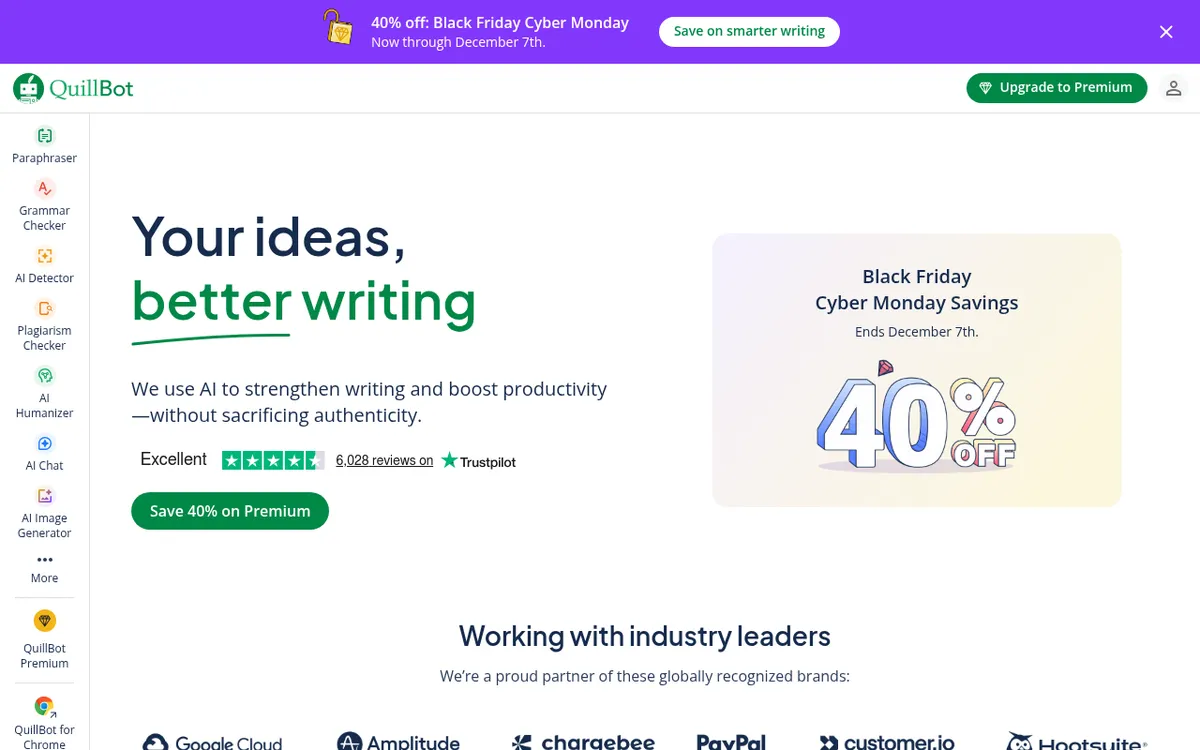
QuillBot Review 2025: The Best AI Paraphrasing Tool for Writers
The AI writing assistant landscape has evolved dramatically, and QuillBot has emerged as the undisputed leader in intelligent paraphrasing technology. With over 50 million users worldwide, this powerful writing platform has transformed from a simple paraphrasing tool into a comprehensive suite that helps students, professionals, and content creators produce polished, original work in a fraction of the time.
QuillBot represents a new paradigm in AI-assisted writing, offering not just paraphrasing but grammar checking, plagiarism detection, summarization, and citation generation—all powered by advanced natural language processing. Whether you're a student crafting an academic paper, a marketer refining copy, or a professional polishing business communications, understanding QuillBot's capabilities could transform your writing workflow in 2025.
What is QuillBot?
QuillBot is an AI-powered writing assistant launched in 2017 by Rohit Gupta, David Silin, and Anil Jason. Originally designed as a paraphrasing tool, it has evolved into a comprehensive writing platform that uses advanced machine learning and natural language processing to help users improve their writing quality, clarity, and originality.
Unlike traditional grammar checkers that focus solely on correcting errors, QuillBot takes a holistic approach to writing improvement. Its AI analyzes context and meaning—not just individual words—to offer suggestions that enhance your text while preserving your intended message. This contextual understanding sets it apart from basic synonym replacers and makes it invaluable for anyone who writes regularly.
The platform is accessible via web browser, Chrome and Edge extensions, mobile apps for iOS and Android, and integrations with Google Docs, Microsoft Word, Gmail, LinkedIn, Slack, and Notion. This multi-platform availability ensures you can access QuillBot's writing assistance wherever you work.
In 2025, QuillBot has received significant upgrades including enhanced AI models for better contextual understanding, new paraphrasing modes, improved plagiarism detection with 99% accuracy, and expanded language support for paraphrasing in 23 languages and translation across 50+ languages.
Key Features
| Feature | Description | Benefit |
|---|
| AI Paraphraser | 9 preset modes plus unlimited custom modes | Rewrite content while preserving meaning |
| Grammar Checker | Real-time grammar, spelling, and punctuation detection | Error-free, professional writing |
| Plagiarism Checker | Scans against billions of sources (20 pages/month Premium) | Ensure content originality |
| Summarizer | Condenses long texts into key points | Save time on research and review |
| AI Detector | Identifies AI-generated content with paragraph-level feedback | Verify content authenticity |
| AI Humanizer | Transforms AI text into natural, human-like language | Improve flow and authenticity |
| Citation Generator | APA, MLA, Chicago, and 100+ citation styles | Accurate academic referencing |
| Translator | Supports 50+ languages with AI accuracy | Global communication support |
| Co-Writer (Flow) | Centralized writing workspace with integrated tools | Streamlined writing workflow |
| Browser Extension | Works in Gmail, Docs, LinkedIn, Slack, and more | Write better everywhere |
How QuillBot Works
QuillBot operates through sophisticated AI technology that analyzes and enhances your writing:
Input Processing: Paste your text into the input box or upload a document (PDF, Word, Google Docs, TXT formats supported). The AI analyzes the content, understanding context, meaning, and intent—not just individual words.
Mode Selection: Choose from 9 paraphrasing modes tailored to specific needs. Free users access Standard and Fluency modes, while Premium unlocks Formal, Academic, Simple, Creative, Expand, Shorten, and Custom modes. Each mode reshapes your content differently based on your goals.
Synonym Slider Control: Adjust how aggressively QuillBot changes your vocabulary. Slide left for minimal changes closer to the original, or right for more creative vocabulary variation. This gives you precise control over the output.
Freeze Words: Lock specific words or phrases you don't want changed during paraphrasing—essential for technical terms, brand names, or specific language you want to preserve.
Output Generation: Click "Paraphrase" and receive instant results. QuillBot provides multiple suggestions, and you can click on any word in the paraphrased text to see alternative synonyms from the AI-powered thesaurus.
Quality Refinement: Use the Grammar Checker to polish the output, run the Plagiarism Checker to verify originality, and leverage the AI Detector to ensure the content reads naturally.
Paraphrasing Modes Explained
| Mode | Function | Best For |
|---|
| Standard | Balanced rephrasing with moderate vocabulary changes | Everyday writing tasks |
| Fluency | Improves clarity and readability while fixing grammar | Rough drafts needing polish |
| Formal | Elevates tone to professional, business-appropriate language | Emails, reports, proposals |
| Academic | Maintains scholarly tone with discipline-appropriate vocabulary | Research papers, essays |
| Simple | Simplifies complex language for broader audiences | Technical content for general readers |
| Creative | Adds flair and unique phrasing | Marketing copy, storytelling |
| Expand | Increases text length with additional detail | Meeting word count requirements |
| Shorten | Condenses text while preserving key meaning | Trimming verbose content |
| Custom | User-defined parameters for tailored output | Specialized writing needs |
Pricing & Plans
| Plan | Price | Features | Best For |
|---|
| Free | $0/forever | 125-word paraphrase limit, 2 modes, 1,200-word summarizer, basic grammar checker | Occasional users, testing |
| Premium Monthly | $19.95/month | Unlimited paraphrasing, 9 modes, 20 pages plagiarism/month, faster processing | Short-term needs |
| Premium Quarterly | $13.31/month ($39.95/3 months) | All Premium features | Medium-term commitment |
| Premium Annual | $8.33/month ($99.95/year) | All Premium features, best value | Regular writers |
| Student Annual | $6.25/month ($74.95/year) | All Premium features, 25% discount | Verified students |
| Teams (5-10 users) | $7.50/user/month | Premium + admin dashboard, analytics, centralized billing | Small teams |
| Teams (11-50 users) | $6.66/user/month | All Teams features | Growing teams |
| Teams (51+ users) | $5.83/user/month | All Teams features, volume discount | Large organizations |
QuillBot offers a 3-day money-back guarantee for first-time Premium users. Subscription can be paused if you're taking a break—a feature not available with competitors like Grammarly.
Pros and Cons
Pros ✓
- Industry-leading paraphrasing with 9 specialized modes for every writing need
- Generous free tier with unlimited daily paraphrases (125 words per use) and no sign-up required
- Affordable Premium pricing at $8.33/month annually—31% cheaper than Grammarly
- Context-preserving AI understands meaning, not just words
- Synonym slider gives precise control over vocabulary changes
- Comprehensive tool suite includes grammar, plagiarism, summarizer, citations, and more
- Extensive integrations with Google Docs, Chrome, Word, Gmail, Slack, LinkedIn, Notion
- Multi-language support for paraphrasing (23 languages) and translation (50+ languages)
- Freeze words feature protects specific terms from changes
- Mobile apps available for iOS and Android
- Subscription pause option saves money during breaks
Cons ✗
- Free tier limited to 125 words per paraphrase
- Only 2 modes (Standard, Fluency) available for free users
- Plagiarism checker requires Premium subscription
- Creative mode can occasionally produce awkward phrasings
- Some grammar checking not as advanced as Grammarly
- AI Humanizer reduces detection by only 40-60% in some cases
- Cannot generate original content—only works with existing text
- Processing speed slower on free tier
Who Should Use QuillBot?
Students and Academics benefit enormously from QuillBot's paraphrasing capabilities. When synthesizing research sources for literature reviews, the tool helps express ideas in your own words while maintaining academic integrity. The Citation Generator handles APA, MLA, Chicago, and 100+ other formats automatically. The Summarizer condenses lengthy research papers into digestible overviews, and the Plagiarism Checker ensures originality before submission.
Content Creators and Bloggers can use QuillBot to overcome writer's block, find fresh ways to express ideas, and ensure content is original. The SEO-friendly paraphrasing helps naturally incorporate keywords, while different modes allow tailoring tone for various platforms.
Business Professionals rely on QuillBot to polish emails, reports, and proposals. The Formal mode elevates tone for executive communications, while the Shorten mode trims verbose content for busy readers. The browser extension works directly in Gmail, Outlook, and LinkedIn for seamless professional writing.
Non-Native English Speakers find QuillBot invaluable for improving fluency and naturalness. The Fluency mode specifically helps transform thoughts into polished English, bridging the gap between thinking in one language and writing in another.
Marketing Teams leverage multiple paraphrasing modes to create content variations, avoid repetitive messaging, and maintain brand voice consistency. The Teams plan provides admin controls, analytics, and shared style guides for organizational alignment.
Researchers and Technical Writers appreciate the Academic mode for maintaining scholarly tone and the Simple mode for making technical content accessible to broader audiences.
QuillBot vs Alternatives
| Feature | QuillBot | Grammarly | Wordtune | Jasper AI |
|---|
| Primary Focus | Paraphrasing | Grammar & Style | Sentence Rewriting | Content Generation |
| Paraphrasing Modes | 9 modes + custom | Limited | Tone adjustments | N/A |
| Free Word Limit | 125 words/use, unlimited daily | 100 words | 10 rewrites/day | 7-day trial |
| Grammar Checker | ✓ Included | ✓ Best-in-class | Basic | Basic |
| Plagiarism Checker | ✓ 20 pages/month | ✓ Unlimited | ✗ | ✗ |
| Citation Generator | ✓ 100+ styles | ✗ | ✗ | ✗ |
| AI Detector | ✓ Included | Limited | ✗ | ✗ |
| Premium Price (Annual) | $8.33/month | $12/month | $9.99/month | $39/month |
| Best For | Paraphrasing & Academic | Grammar Perfection | Quick Rewrites | Marketing Content |
wins for dedicated paraphrasing, academic writing support, and overall value. Its 9 specialized modes and synonym slider provide unmatched control over content rewriting.
Grammarly offers superior grammar checking and style suggestions but lacks QuillBot's paraphrasing depth. Best for users who prioritize error-free writing over rewriting capabilities.
Wordtune specializes in quick sentence-level rewrites with tone adjustments. Good for brief edits but lacks the comprehensive tool suite QuillBot offers.
Jasper AI focuses on generating original content from scratch—a different use case entirely. Significantly more expensive and geared toward marketing teams.
Tips for Getting Started
Start with the free version to experience QuillBot's paraphrasing capabilities without commitment. You can rephrase unlimited times daily at 125 words per use—enough to evaluate the tool thoroughly.
Master the synonym slider early. This powerful control lets you balance between staying close to your original text (slide left) and creative rewriting (slide right). Finding your preferred setting dramatically improves results.
Use Freeze Words strategically to protect technical terms, brand names, proper nouns, or specific phrases you don't want altered. This prevents awkward rewrites of specialized language.
Match modes to your purpose. Use Academic for research papers, Formal for business communications, Simple when writing for general audiences, and Creative for marketing content. The right mode transforms results.
Install the browser extension to access QuillBot directly in Google Docs, Gmail, LinkedIn, Slack, and other platforms. This eliminates copy-pasting and streamlines your workflow.
Leverage the Co-Writer (Flow) for longer projects. This centralized workspace integrates paraphrasing, grammar checking, summarizing, and research tools in one place—no tab-switching required.
Always review AI outputs for brand voice and accuracy. While QuillBot's paraphrasing is highly accurate, complex topics may require manual adjustments to preserve nuance.
Combine with other tools strategically. Many professionals use QuillBot for paraphrasing alongside Grammarly for grammar—the tools complement each other well.
Final Verdict
Rating: 8.9/10
QuillBot has earned its position as the leading AI paraphrasing tool for good reason. Its 9 specialized modes, intuitive synonym slider, and comprehensive feature suite deliver exceptional value for writers across all disciplines. At $8.33/month annually—31% cheaper than Grammarly—it offers premium capabilities at an accessible price point.
The platform excels for students, researchers, and anyone who regularly needs to rewrite content while preserving meaning. The combination of paraphrasing, grammar checking, plagiarism detection, summarization, and citation generation creates a complete academic writing toolkit that competitors struggle to match.
While the free tier's 125-word limit may feel restrictive for heavy users, it's generous enough for testing and occasional use. The ability to pause subscriptions during breaks adds flexibility that other platforms don't offer.
Recommendation: QuillBot is highly recommended for students, academics, content creators, and professionals who prioritize paraphrasing and original content creation. For users who need comprehensive grammar checking above all else, Grammarly remains the better choice—but for paraphrasing excellence at an unbeatable price, QuillBot is the clear winner in 2025.
Ready to transform your writing? Try QuillBot free at quillbot.com with no sign-up required. Start paraphrasing instantly, then upgrade to Premium to unlock unlimited words, all 9 modes, and the complete writing toolkit trusted by 50+ million users worldwide.